100 Club Draw
The winner of February’s draw is Nikki Bacchus.
100 Club draw
CLASP Trustees Meeting 10th January 2024
The minutes for the above meeting are available in the members section of the website (password required).
CLASP Trustees Meeting 4th October 2023
The minutes for the above meeting are available in the members section of the website (password required).
CLASP Winter Newsletter 2023
Good news for those who like to sit down with a glass of beer – or a warm cup of tea – and relax with a good read over Christmas; the CLASP Winter Newsletter for 2023 is available. This latest newsletter includes notes from the 2023 AGM Chairman’s address and a very in-depth view from the CLASP Archaeological Director. Well worth a read!
2023 AGM
Draft minutes for the CLASP 2023 AGM are now available in the members section.
2023 Lecture Series videos available
All the lectures from the 2023 lecture series are available (nore to be added as the series progresses) at the CLASP video site.
- The CLASP Facebook Group now has over 100 members, with interesting posts added every day – join the Group to be able to post and comment
- CLASP Membership extended to 16/17 year olds
- REPORT: The 2019 dig at the Whitehall Farm Anglo-Saxon Cemetery
CLASP brings local archaeology enthusiasts together to investigate their local past.
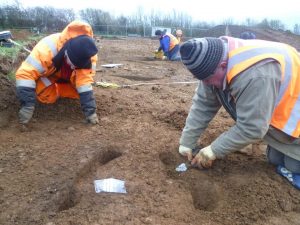 Our members, all volunteers, are technically led by our professionally qualified Archaeological Director, himself a volunteer. Members are encouraged and enabled to learn skills for themselves, both formally and ‘in the field’, to become confident and self-sufficient in all aspects of archaeological investigation.
CLASP also provides talks and lectures as part of its commitment to encouraging local communities to ‘own’ their archaeological heritage.
Join us! (It’s only £10 per annum!)
- You can find out more about CLASP by excavating this website using the links at the top of the page.
- News and new website features are signalled as “Posts” which you see listed in the column on the right.
REPORTS
 The Reports & Submissions section of this website includes:
- CLASP case-studies
- CLASP reports on projects and activities
- CLASP geophysical survey reports
- CLASP technical guidance documents
- CLASP submissions to planning enquiries
To enter the Members’ Area, or to read “Protected” posts, you will need to be a CLASP Individual Member, and to use the password shown on your current CLASP membership card.